


Introduction
Nowadays, many selfhosters and organizations run Traefik as reverse proxy. Additionally, many also use another reverse proxy or even CDN network like Cloudflare in front. The reasons for this are manyfold:
- Hiding the real origin IP address of the server at home
- Running a DMZ with an OPNSense firewall before the actual Traefik server
- Making use of CDN features like WAF, caching, geo-blocking
For advanced users, this network setup often times raise questions:
- How to obtain the correct visitor's IP address in Traefik's access logs?
- How to pass the correct visitor's IP address to backend services and logs?
- How to use Traefik's IPAllowList middleware for whitelisting IPs?
This blog post will target these questions and solve each of them separately.
Network Setup
For this blog post, we assume that Traefik is run as Docker container with a regular Docker bridge network. The Traefik container exposes TCP/80 and TCP/443 to the outside world and internal LAN.
Only network packets originating from known Cloudflare IPv4/IPv6 addresses or from local LAN are allowed through the firewall. For LAN requests, local DNS servers (such as PiHole or AdGuard Home) handle split-brain DNS. This ensures that local devices communicate directly with Traefik without routing traffic through Cloudflare. This approach also avoids issues such as NAT loopback and is the recommended method for resolving domains.
Finally, for remote access, Cloudflare is used as the CDN in front of Traefik. Within Cloudflare, the relevant DNS A records are defined to point to the home router’s WAN IP address. All traffic is routed and proxied through Cloudflare by enabling the orange cloud option in the DNS settings. The router then performs NAT and forwards incoming requests on TCP/80 and TCP/443 to the internal Traefik server at home.
Our Goals
The following goals want to be achived using this network setup:
- Obtain the real visitor IP address in Traefik's access logs
- Important for subsequent security tools like CrowdSec or threat intelligence dashboards like Grafana that parse such access logs.
- Pass the real visitor IP address downstream to backend servers (e.g. Nginx)
- Important for subsequent security tools like CrowdSec that pass such backend service's logs or other dashboards.
- Be able to dynamically restrict access via an IPAllowList middleware in Traefik.
- For example, to restrict access to services from local LAN only or from specific external IP addresses of friends, partners or VPN gateways.
Real Visitor IP in Access Logs
Obtaining the real visitor's IP address in Traefik's access logs is quite straight-forward. Although the Internet holds a lot of tutorials, honestly, most of them are plain wrong.
There is only one correct way to obtain the real visitor's IP while using a CDN or other reverse proxies in front of Traefik:
ProxyProtocol for TCP packets or defining the IP addresses of the CDN or reverse proxy in front at entrypoint level using forwardedHeaders.TrustedIPs for HTTP packets.Middleware plugins (e.g. cloudflarewarp from Bettercorp) can only pass the correct visitor IP address to backend servers. They will not be able to pass the correct IP address into Traefik's access logs.
So, to obtain the correct visitor IP address in our Traefik access logs, we must define the IP addresses of the Cloudflare CDN network as trusted IPs on entrypoint level. No middleware plugin can handle this!
The Cloudflare CDN IPs (IPv4 and IPv6) are publicly known and can be retrieved programatically from the following HTTP endpoint:


Therefore, we can just define them as trustedIPs in our entrypoints:
entryPoints:
  http:
    address: :80
    forwardedHeaders:
      trustedIPs: &trustedIps
        # start of clouflare public IP list
        - 103.21.244.0/22
        - 103.22.200.0/22
        - 103.31.4.0/22
        - 104.16.0.0/13
        - 104.24.0.0/14
        - 108.162.192.0/18
        - 131.0.72.0/22
        - 141.101.64.0/18
        - 162.158.0.0/15
        - 172.64.0.0/13
        - 173.245.48.0/20
        - 188.114.96.0/20
        - 190.93.240.0/20
        - 197.234.240.0/22
        - 198.41.128.0/17
        - 2400:cb00::/32
        - 2606:4700::/32
        - 2803:f800::/32
        - 2405:b500::/32
        - 2405:8100::/32
        - 2a06:98c0::/29
        - 2c0f:f248::/32
        # end of cloudlare public IP list
    http:
      redirections:
        entryPoint:
          to: https
          scheme: https

  https:
    address: :443
    forwardedHeaders:
      # reuse list of cloudflare ips stated above
      trustedIPs: *trustedIps
    ...
    ...
Traefik entrypoint definitions
&trustedIps to only define the Cloudflare IPs once and then be able to re-use them later at the subsequent https endpoint - without stating all IP ranges again. Cool!That's it. Your Traefik access logs now state the corrrect visitor's IP address in the ClientHost JSON field. Cloudflare's CDN IP is also logged but in the ClientAddr field.

Real Visitor IP for Backend Services
Once the Cloudflare CDN IP ranges are defined as trusted IPs, Traefik will automatically pass the correct visitor IP address to backend services within the X-Forwarded-For (XFF) and X-Real-IP (XRI) header.
Typically, the XFF header will hold two IP addresses. Namely, the one of your real website visitor as well as the IP address of one of Cloudflare's edge servers. For each network hop, Traefik appends the hop's IP address to the XFF header. The XRI header instead will hold only a single IP address, namely our visitor's real IP.
An example XFF header may look like this:
X-Forwarded-For: 145.144.64.64, 172.69.224.81An example XFF header structure for external requests
An example XRI header may look like this:
X-Real-IP: 145.144.64.64An example XRI header structure for external requests
Now comes the culprit: SECURITY
Per default, reverse proxies won't trust random HTTP headers stated in a randomly received HTTP packet. This is done for security reasons. Especially the HTTP headers X-Forwarded-For or X-Real-IP besides many others are often used for security-related decisions. For example, for deciding whether an IP address is allowed to access a web resource or not (whitelisting, access control). Alternatively, for protecting against common web attacks like Cross-Site Request Forgery (CSRF).
Due to this, any backend servers running behind Traefik may see the X-Forwarded-For header but will just ignore it. One has to explicitly tell a backend web server like Nginx to trust such headers set by another reverse proxy in front. Namely our Traefik reverse proxy and for external requests also Cloudflare CDN edge servers.
If we have a look at a popular reverse proxy like Nginx, we can implement such trust in its default configuration file. There, we have to define the exact IP address of each reverse proxy in front as trusted using the set_real_ip_from directive. Finally, we can define the HTTP header to parse via real_ip_header to obtain the visitor's real IP.
Here, an example Nginx config:
server {
    listen 80 http2;
    server_name example.com;
    root /var/www/;
    index index.html

    # define trusted reverse proxies in front
    # here: using private class ranges
    # alternatively: defining the exact traefik ip address
    set_real_ip_from 172.16.0.0/12;
    set_real_ip_from 10.0.0.0/8;
    set_real_ip_from 192.168.0.0/16;

    # cloudflare ranges
    set_real_ip_from 103.21.244.0/22;
    set_real_ip_from 103.22.200.0/22;
    set_real_ip_from 103.31.4.0/22;
    set_real_ip_from 104.16.0.0/13;
    set_real_ip_from 104.24.0.0/14;
    set_real_ip_from 108.162.192.0/18;
    set_real_ip_from 131.0.72.0/22;
    set_real_ip_from 141.101.64.0/18;
    set_real_ip_from 162.158.0.0/15;
    set_real_ip_from 172.64.0.0/13;
    set_real_ip_from 173.245.48.0/20;
    set_real_ip_from 188.114.96.0/20;
    set_real_ip_from 190.93.240.0/20;
    set_real_ip_from 197.234.240.0/22;
    set_real_ip_from 198.41.128.0/17;
    set_real_ip_from 2400:cb00::/32;
    set_real_ip_from 2606:4700::/32;
    set_real_ip_from 2803:f800::/32;
    set_real_ip_from 2405:b500::/32;
    set_real_ip_from 2405:8100::/32;
    set_real_ip_from 2a06:98c0::/29;
    set_real_ip_from 2c0f:f248::/32;

    # defining the header to parse for real visitor ip
    real_ip_header    X-Forwarded-For;
    real_ip_recursive on;

    # some other security related settings
    proxy_hide_header X-Powered-By;
    server_tokens off;
    etag off;
}
An example Nginx configuration parsing XRI header
This is only considered secure if you trust your internal network. If not, please define the exact /32 IP address of the Traefik container and make it permanent.
That's it. Your Nginx access logs now state the corrrect visitor's IP address, which was passed along downstream by Traefik via the XFF header.
Therefore, one can use a Traefik plugin to handle it. Many popular plugins (e.g. cloudflarewarp by bettercorp) re-write Traefik headers and ensure that the
X-Real-IP is overwritten with the real visitor's IP address. In our Nginx config, we can then simply parse the XRI header sent by Traefik, instead of XFF and leave the CF IPs unset.But wait, a better plugin is introduced later in this blog.
Access Control via IPAllowList Middleware
Alright. Now we have understood how to obtain a visitor's real IP address in Traefik's access log as well as pass it downstream to backend servers. If those backend servers are configured properly too, the real IP address is also logged there.
Advanced users may opt for additional IP whitelisting now.
Defining an IPAllowList Middleware
Traefik supports a middleware layer named IPAllowList for that. One can configure it in Traefik's dynamic configuration file, which may look like this:
http:
  middlewares:

    specific-ipwhitelist:
      IPAllowList:
        sourceRange:
          - 145.144.64.64/32 # a public ip to whitelist
          - 192.168.178.0/24 # a local lan subnet
Traefik IPAllowList middleware
Afterwards, one can enable the middleware for a backend service. Effectively defining strict access controls, from which IP source range the backend service can be accessed or not. If the HTTP request originates from one of the trusted IPs in the sourceRange, Traefik passes the request downstream. Otherwise, Traefik responds with 401 Forbidden. Simple as that.
Enabling an IPAllowList Middlware
Based on the popular whoami container, we do an example on how to enable such IPAllowList middleware for access restrictions:
services:

  whoami:
    image: traefik/whoami
    container_name: whoami
    hostname: whoami
    restart: unless-stopped
    expose:
      - 80
    environment:
      - WHOAMI_NAME=whoami
      - WHOAMI_PORT_NUMBER=80
    networks:
      - proxy
    labels:
      - traefik.enable=true
      - traefik.docker.network=proxy
      - traefik.http.routers.whoami.rule=Host(`whoami.example.com`)
      - traefik.http.services.whoami.loadbalancer.server.port=80
      - traefik.http.routers.whoami.middlewares=specific-ipwhitelist@file

networks:
  proxy:
    external: true
Whoami container behind Traefik
Once the middleware is defined as label for our whoami container, access restrictions based on the originating IP address of an HTTP request should be in place. Right?
The Whitelisting Problem
Partially. The IP whitelisting works fine for all requests originating from local LAN. However, for externally originating requests over Cloudflare from the visitor IP address 145.144.64.64/32, we only receive a 401 Forbidden. Why though? I thought we have whitelisted this IP in the IPAllowList middleware.
Simply spoken, Traefik was not told to validate the 145.144.64.64/32 IP address from XFF header. Instead, if an IPAllowList middleware is configured as above, without stating an IP strategy (excludeIPs or depth), it will just use the IP address from RemoteAddr (TCP peer). At that point in time, the remote IP will just be that of an Cloudflare CDN edge server and not any real visitor's IP address.
Mhmm ... can we fix it?
Using IPStrategy and Depths
Yes. Basically, we have to tell Traefik to validate against an IP address stated in the XFF header. As we have already ensured that the real visitor's IP is passed via the XFF header downstream (via the trustedIPs in Traefik's entrypoints), we should be good to go.
So what is an IP strategy and depth regarding an IPAllowList middleware?
The depth option tells Traefik to use the X-Forwarded-For header and take the IP located at the depth position (starting from the right).
If depth is greater than the total number of IPs in X-Forwarded-For, then the client IP will be empty. depth is ignored if its value is less than or equal to 0.
[Source]
Therefore, we can enable the IP strategy for our previously defined IPAllowList middleware and state a depth that tells Traefik which IP to use for validation.
IPStrategy Depth 1
Let's revise how an XFF header is structured for external HTTP requests over Cloudflare:
X-Forwarded-For: 145.144.64.64, 172.69.224.81Revised XFF header structure for external requests
Now we can see that we must use a depth of 1. The depth 0 would be again a Cloudflare edge IP (172.69.224.81) and not helpful. Our target real visitor IP is at depth 1 (145.144.64.64).
So let's configure this:
http:
  middlewares:

    specific-ipwhitelist:
      IPAllowList:
        sourceRange:
          - 145.144.64.64/32 # a public ip to whitelist
          - 192.168.178.0/24 # a local lan subnet
        ipStrategy:
          depth: 1
Traefik IPAllowList middleware with depth 1
If we now try to access our whoami container externally, coming from the IP address 145.144.64.64 and going over Cloudflare, we confirm that our IP whitelisting works now. Great!
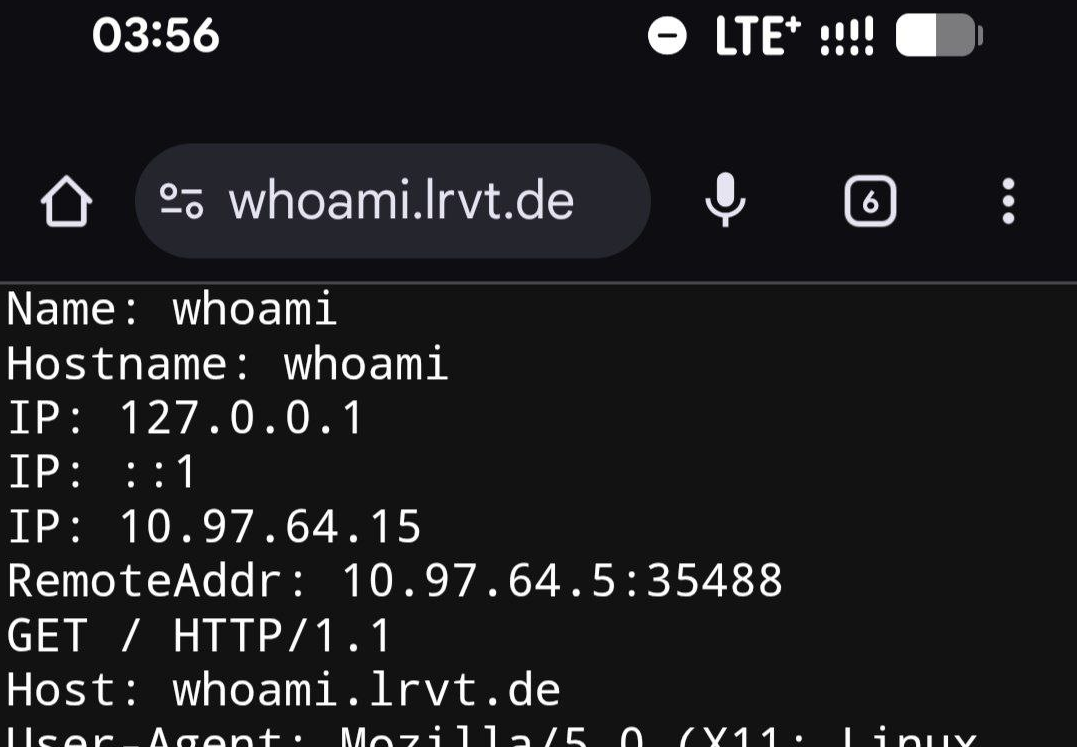
Let's do a final check and access it also from local LAN. Just to make sure.
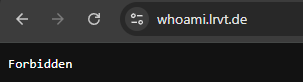
Dafuq? Why do requests from local LAN now stop working?
Let's check Traefik's debug logs:
2025-09-29T03:47:02+02:00 DBG github.com/traefik/traefik/v3/pkg/middlewares/ipallowlist/ip_allowlist.go:78 > Rejecting IP : empty IP address middlewareName=specific-ipwhitelist@file middlewareType=IPAllowListerTraefik debug logs

Empty IP address? What is even going on?
Here comes the explanation:
As a middleware, whitelisting happens before the actual proxying to the backend takes place. In addition, the previous network hop only gets appended to X-Forwarded-For during the last stages of proxying, i.e. after it has already passed through whitelisting. Therefore, during whitelisting, as the previous network hop is not yet present in X-Forwarded-For, it cannot be matched against sourceRange.
[Source]
Basically, as we directly access and talk to Traefik from local LAN, there is no additional network hop to add to the XFF header. Due to this, the XFF header only contains a single IP address. Namely an IP address from our local LAN range. If we revise the documentation regarding IP strategy, we will see the culprit:
If depth is greater than the total number of IPs in X-Forwarded-For, then the client IP will be empty.
So, we have told Traefik to parse an IP address from the XFF header, which should be at depth 1. However, as there is only a single IP address from local LAN, there is no depth 1. Due to this, the client IP will be empty and can therefore not be validated against any sourceRange from our IPAllowList middleware.
IPStrategy Depth 0
So, for our internal LAN requests to work properly again with our IPAllowList middlware, we have to adjust and fix the IP strategy's depth.
Let's do this. It's just a change of a single number:
http:
  middlewares:

    specific-ipwhitelist:
      IPAllowList:
        sourceRange:
          - 145.144.64.64/32 # a public ip to whitelist
          - 192.168.178.0/24 # a local lan subnet
        ipStrategy:
          depth: 0
Traefik IPAllowList middleware with depth 0
Alright, now requests from internal LAN should work again:
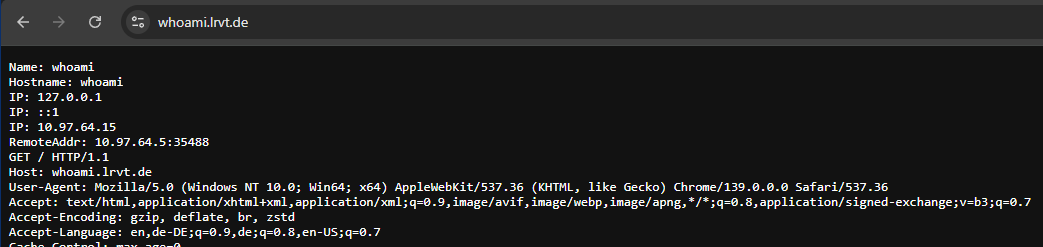
Let's do a final check and access it from remote over Cloudflare again. Just to make sure:
You are trolling me, right? What's going on?
depth 1 as the XFF header holds two IP addresses (real visitor IP and Cloudflare edge). For locally originating requests though, we must use depth 0 as the XFF header only holds a single IP. And here is the problem:
- Defining both depths in the same IPAllowList middleware does not work.
- Defining multiple IPAllowList middlewares with different depths is possible but applying both to the same Traefik router is counter productive. One of the applied middlewares will definitely block access. Chaining the middlewares does not work too.
- Defining multiple routers with different middlewares, just to allow access from external IPs and local IPs, is cumbersome and increases complexity. Also, who wants to have a different subdomain via the
Host()label just for whitelisting? - Defining different entrypoints, just to make whitelisting based on external/internal IPs work, is cumbersome and increases complexity.
So, is this a dead end? Nope, we can fix it!
TraefikWarp Middleware Plugin
The above outlined problems can be fixed using a specifically crafted middleware plugin called TraefikWarp.


 l4rm4nd
TraefikWarp automatically fetches the latest Cloudflare and AWS CloudFront IPv4/IPv6 CIDR ranges from their official endpoints and builds an in-memory allowlist. On every middleware request, it validates the remote socket IP against this allowlist. Only when it matches, the middleware trusts the specific provider's headers to resolve the visitor’s real IP address.
It then normalizes X-Forwarded-Proto to http or https and sets X-Forwarded-For, X-Real-IP, X-Warp-Trusted, and X-Warp-Provider. The resolved address is then propagated to backend services and recorded in the backend service's access logs. CDN CIDR IP addresses are regularly refreshed (default every 12h).
To solve the problem of having to use different IP strategy depths, TraefikWarp simply adds the IP address for local LAN requests another time to the XFF header. Although being a duplicate entry then, it fixes the outlined issues successfully. One can then simply use an IP strategy with depth 1 and whitelisting works flawlessly for local as well as public IP addresses.
Enabling the Plugin
You can enable the plugin in Traefik's static configuration file as follows:
experimental:
  plugins:
    traefikwarp:
      moduleName: github.com/l4rm4nd/traefik-warp
      version: v1.1.5 # <-- ensure to use a latest release
Traefik plugin definition
v1.1.5 may have not been released on the store yet. Please be patient, as previous versions do not implement this XFF fix.Defining the Middleware
Afterwards, we have to define the middlewares in Traefik's dynamic configuration file:
http:
  middlewares:

    specific-ipwhitelist:
      IPAllowList:
        sourceRange:
          - 145.144.64.64/32 # a public ip to whitelist
          - 192.168.178.0/24 # a local lan subnet
        ipStrategy:
          depth: 1

    cf-warp:
      plugin:
        traefikwarp:
          provider: cloudflare
          autoRefresh: true
          refreshInterval: 24h
          debug: false
Traefik middleware definitions
Using the Middleware
Finally, we can apply the new middleware to our backend services.
services:

  whoami:
    image: traefik/whoami
    container_name: whoami
    hostname: whoami
    restart: unless-stopped
    expose:
      - 80
    environment:
      - WHOAMI_NAME=whoami
      - WHOAMI_PORT_NUMBER=80
    networks:
      - proxy
    labels:
      - traefik.enable=true
      - traefik.docker.network=proxy
      - traefik.http.routers.whoami.rule=Host(`whoami.example.com`)
      - traefik.http.services.whoami.loadbalancer.server.port=80
      - traefik.http.routers.whoami.middlewares=cf-warp@file,specific-ipwhitelist@file

networks:
  proxy:
    external: true
Whoami container behind Traefik with enabled middlewares
We can now access our whoami container from both, local LAN as well as external networks routed over the Cloudflare CDN. The middleware plugin will take care of defining the correct and real visitor's IP address in the XFF header based on trusted CDN edge headers like CF-Connecting-IP.
Additionally, the plugin will set the real visitor's IP address in the X-Real-IP header and state the plugin's decision in two custom HTTP headers:
- X-Warp-Provider
- The detected provider (Cloudflare or CloudFront) based on the edge server's IP address
- X-Warp-Trusted
- A boolean value stating whether a provider's HTTP headers were trusted (e.g.
CF-Connecting-IPfor Cloudflare andCloudfront-Viewer-Addressfor CloudFront).
- A boolean value stating whether a provider's HTTP headers were trusted (e.g.
For example, in our previously defined Nginx configuration file. Here, we can just parse the
X-Real-IP header sent by Traefik and be totally sure to have obtained the correct visitor IP address from trusted CDN edge servers or local LAN. Without having to define Cloudflare IPs as trusted in the Nginx config and keep them up-to-date. Brilliant!Summary
Juggling and passing IP addresses around correctly is not always easy.
However, as we have seen, using a dedicated Traefik plugin TraefikWarp makes it possible to leverage IPAllowList middlewares in Traefik for both private and public IP ranges, even when a CDN or another reverse proxy is in front.
The plugin behaves like many other real IP plugins but implements proper security via edge CDN IP verification before parsing headers and implements a simple but effective XFF header trick to make IPAllowList middlewares work smoothly while using a CDN or another proxy in front of Traefik 😉
Cheers!


Discussion