


The CrowdSec release v1.8.0 introduced a new feature called Bot Detection.
In this blog post, I’ll show you how to enable and use Bot Detection with Traefik. The goal is to detect and mitigate unwanted automated traffic before it reaches your applications.
I won’t cover the basics of deploying Traefik, installing CrowdSec, or configuring Traefik middlewares. I’ll assume you already have a working Traefik and CrowdSec setup using Docker Compose. If you’re starting from scratch, take a look at our previous blog post on setting up Traefik with CrowdSec first.
 LRVT
LRVT
Reasons for Bot Detection
Native CrowdSec provides several layers of protection.
First, the CrowdSec security engine can analyze events (logs) from sources such as web servers, reverse proxies and syslog. It matches these events against installed detection scenarios and creates security decisions when an IP address exhibits malicious behavior.
Second, CrowdSec does not necessarily have to observe an attack locally via log events before it can take action. CrowdSec also provides access to its Cyber Threat Intelligence (CTI), which contains information about IP addresses that are already known and reported to be malicious. This allows CrowdSec to identify and block known bad IPs before they even hit your infrastructure and fill logs with malicous payloads and activities.
This gives us two complementary ways of detecting unwanted traffic:
                         Incoming request
                                │
                                ▼
                             Traefik
                                │
                                ▼
                         Traefik Bouncer
                                │
                                ▼
              ┌───────────────────────────────────────┐
              │ Existing decision or bad IP from CTI? │
              └─────────────────┬───┬─────────────────┘
                           Yes  │  No
                          ┌─────┘   └──────────────┐
                          ▼                        ▼
                  Block/Deny/Captcha          Application
                          │                        │
                          │                        ▼
                          │                Response & Logging
                          │                        │
                          │                        ▼
                          │                     CrowdSec
                          │                        │
                          │                        ▼
                          │                Detection scenario
                          │                        │
                          │                        ▼
                          └──────────────► Security decision
                                                   │
                                                   ▼
                                            Traefik Bouncer
Bot Detection now adds another dimension to this process. Instead of looking exclusively for known malicious IP addresses, already existing decisions or new attack patterns in logs, CrowdSec can also identify automated clients, so-called robots or bots, based on their behavior. This is particularly useful because not every bot is necessarily malicious and not every malicious client is already present in the CTI threat-intelligence database. A crawler, scraper, scanner, or other automated client may originate from an IP address that has never previously been observed by CrowdSec.
Bot Detection therefore complements the existing CrowdSec capabilities:
- CTI provides knowledge about IPs that are already known to be malicious and enables your local Crowdsec + bouncer to block such requests instantly.
- Scenarios and Parsers can additionally identify new malicious behavior observed in your own environment and logs + share such offending IPs with CrowdSec CTI and the community.
- WAF Bot Detection can now identify unwanted automated clients based on their behavior using AppSec WAF and instantly block such requests via client-side PoW challenges and device fingerprinting.
- Traefik Bouncer enforces the resulting decisions before traffic even reaches your web services behind Traefik.
Interested how bot detection works under the hood? Check out the technical walkthrough by CrowdSec:


Prerequisites
In order to use CrowdSec's new bot detection feature, you will need:
- Traefik as reverse proxy
- Traefik CrowdSec Bouncer plugin
- Traefik middleware enabling CrowdSec WAF with bot detection
- CrowdSec instance with bot detection collection and basic AppSec WAF setup
Adjusting CrowdSec
CrowdSec itself requires a few changes to enable the new bot detection feature.
The official documentation can be found at:


Install Bot Detection Collection
We need to adjust our CrowdSec docker compose slightly in order to install a new collection for bot detection.
This is easily done by opening your docker-compose.yml and adding the default crowdsecurity/appsec-bot-challenge collection to the environment variable COLLECTIONS:
services:

  crowdsec:
    image: crowdsecurity/crowdsec:v1.8.1
    container_name: crowdsec
    ...
    ...
    environment:
      - COLLECTIONS=crowdsecurity/traefik crowdsecurity/http-cve crowdsecurity/base-http-scenarios crowdsecurity/sshd crowdsecurity/linux crowdsecurity/appsec-generic-rules crowdsecurity/appsec-virtual-patching crowdsecurity/appsec-crs crowdsecurity/appsec-bot-challenge
Upon restarting CrowdSec, the additional collection will be installed during startup.
Alternatively, one may use the following CSCLI command to install it directly:
docker exec crowdsec cscli collections install crowdsecurity/appsec-virtual-patching crowdsecurity/appsec-generic-rules crowdsecurity/appsec-bot-challengeEnable Bot Detection as WAF Module
We need to adjust our CrowdSec aquis.yaml in order to enable the CrowdSec WAF and the new bot detection module.
Head over to your aquis file, typically located at the following path:
<your-persisted-docker-volume>/crowdsec/etc/acquis.yaml<your-persisted-docker-volume>/crowdsec/etc/acquis.d/waf-bot.yaml
Then, open the YAML file and add the following to the end of it:
---
listen_addr: 0.0.0.0:7422
appsec_configs:
  - crowdsecurity/appsec-bot-*
name: crowdsecBotDetection
source: appsec
labels:
type: appsec--- are really needed and tell CrowdSec where a new configuration starts. If you are already running a custom AppSec config on
0.0.0.0:7422, you can either add the appsec-bot-* rules to your existing one or define a new AppSec listener on a different port. If you create a new one and listen on a different port, you must also adjust the Traefik bouncer middleware later on at crowdsecAppsecHost.crowdsecurity/appsec-bot-challenge automatically installs the good bots exclusion bundle, which ensures that search engines, AI crawlers, social networks and monitoring solutions are not blocked by the CrowdSec bot detection.If you do not want to whitelist those, please adjust the
appsec_configs above and only list specific submodules. A minimal default configuration with no bot whitelisting would contain crowdsecurity/appsec-bot-challenge-scoring and crowdsecurity/appsec-bot-challenge-scoring-balanced only.Upon restarting CrowdSec, the new WAF AppSec source is available, which currently only holds the new bot detection rules and its default subsets. No OWASP CoreRuleSet (CSR) or any other WAF rules. Just the new bot detection.
Restart CrowdSec
Just a friendly reminder to restart CrowdSec now.
After adjusting the to-be-installed collections and adding a new WAF AppSec source, you must restart it to take effect.
docker compose up -d --force-recreateAdjusting Traefik
Traefik itself also needs a few changes.
Install Traefik CrowdSec Bouncer
If you are already running CrowdSec and Traefik, there is a high likelihood that you are already make use of the infamous Crowdsec Bouncer Traefik Plugin by maxlerebourg. If not, it's time to use it 😉
 maxlerebourg
We will keep using this plugin but make sure to use the latest alpha version that introduced support for CrowdSec's new bot detection feature.
Let's open your static Traefik configuration and make sure to install the plugin in its proper version. Your static Traefik configuration file is typically located at:
<your-persisted-docker-volume>/traefik/traefik.yml
Once opened, please add the following lines to the beginning:
# crowdsec bouncer
experimental:
  plugins:
    bouncer:
      moduleName: github.com/maxlerebourg/crowdsec-bouncer-traefik-plugin
      version: v1.8.0-alpha
Upon restarting Traefik, the bouncer plugin will be installed during startup.
Define Traefik WAF Middleware with Bot Detection
Finally, we have to define a new bouncer middleware in Traefik that makes use of CrowdSec's WAF feature with the new bot detection feature.
To do so, please open your dynamic Traefik configuration file. The file is typically located at:
<your-persisted-docker-volume>/traefik/fileConfig.yml
Once opened, please add the following lines:
  middlewares:

    crowdsec-bot-detection:
      plugin:
        bouncer:
          enabled: true
          updateIntervalSeconds: 60
          updateMaxFailure: 0
          defaultDecisionSeconds: 60
          httpTimeoutSeconds: 60
          crowdsecMode: live
          crowdsecAppsecEnabled: true
          crowdsecAppsecHost: crowdsec:7422
          crowdsecAppsecFailureBlock: true
          crowdsecAppsecUnreachableBlock: true
          crowdsecLapiKey: <YOUR-LAPI-KEY>
          crowdsecLapiHost: crowdsec:8080
          crowdsecLapiScheme: http
          crowdsecLapiTLSInsecureVerify: false
          forwardedHeadersTrustedIPs:
            - 10.0.0.0/8
            - 172.16.0.0/12
            - 192.168.0.0/16
          clientTrustedIPs:
            - 10.0.0.0/8
            - 172.16.0.0/12
- 192.168.0.0/16crowdsecLapiHost. If you already have another CrowdSec middleware defined, you may re-use the existing LAPI key. Alternatively, just create a new one.aquis.yaml configuration file, you also have to reflect this new listening port at the bouncer's crowdsecAppsecHost config. If not, just use the default 7422 as provided.clientTrustedIPs was already supplied with local LAN IP ranges as whitelist. This ensures that CrowdSec won't ban your locally running monitoring solutions or trustworthy clients in the same local network as Traefik. Please adjust or remove according to your risk appetite.
As the dynamic file of Traefik is automatically applied upon change, there is no need to restart Traefik.
Restart Traefik
Just a friendly reminder to restart Traefik now.
After adjusting the static Traefik configuration file to install the bouncer plugin, you must restart it to take effect.
docker compose up -d --force-recreateEnabling Bot Detection
As usual, Traefik provides various ways to enable middlewares.
One can either define middlewares as enabled per default on entrypoint-level or be specific and activate the middleware only selectively for each docker compose stack and router via Traefik labels. The choice is yours.
Personally, I recommend enabling the new bot detection feature selectively via labels. Just open one of your exposed web services over Traefik and apply the new middleware crowdsec-bot-detection at router-level.
Here is an example using the Traefik whoami container:
services:

  whoami:
    image: traefik/whoami
    container_name: whoami
    hostname: whoami
    restart: unless-stopped
    expose:
      - 80
    environment:
      - WHOAMI_NAME=whoami
      - WHOAMI_PORT_NUMBER=80
    labels:
      - traefik.enable=true
      - traefik.http.routers.whoami.rule=Host(`whoami.example.com`)
      - traefik.http.services.whoami.loadbalancer.server.port=80
      # Optional part for traefik middlewares
      - traefik.http.routers.whoami.middlewares=crowdsec-bot-detection@file
Testing Bot Detection
Upon starting the example Traefik whoami Docker stack, the whoami service will be proxied by Traefik as reverse proxy and the bouncer middleware with CrowdSec's bot detection (WAF) will be active.
Upon accessing the whoami container via a browser, the Traefik bouncer will provide CrowdSec's bot verification page that runs JavaScript to audit your client's browser. There will be a CrowdSec verification page displayed that will happily redirect to the whoami web service on success.
Success meaning, you are not a bad bot and trustworthy 😉
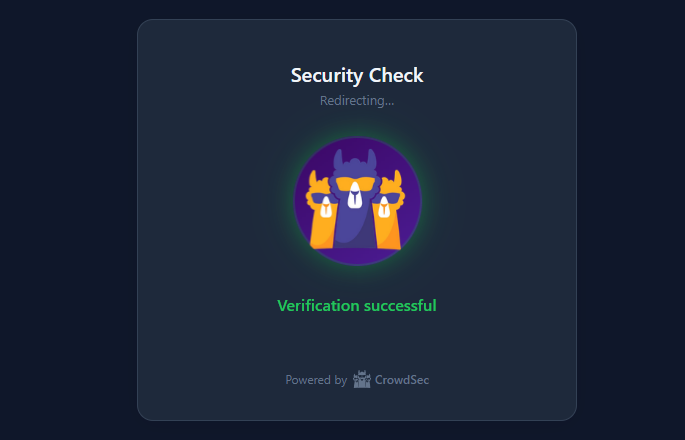
Especially the key
clientTrustedIPs as this directive defines IPs or IP ranges excluded from CrowdSec's banning and bot checking. We defined local LAN IPs to be excluded from banning and bot checking.Just test from mobile LTE and you'll see the bot verification in action!
In case you are banned or blocked, you can inspect CrowdSec logs and unban IPs as follows:
# inspect bot detection alerts
docker exec crowdsec cscli alerts list --kind bot-detection --limit 10

# manually unban an ip address
docker exec crowdsec cscli decisions remove --ip <IP>
Troubleshooting
You may find your existing monitoring solutions to fail once CrowdSec's new bot detection feature is enabled accross your infrastructure.
In my case for example, UptimeKuma was detected as bad bot and banned by CrowdSec. The monitoring checks then failed, as UptimeKuma was blocked from accessing my infrastructure web services behind Traefik.
The simple solution was to whitelist the UptimeKuma instance and its remote IPv4 address at the Traefik bouncer. Just modify the directive clientTrustedIPs and add your trustworthy monitoring solutions 😉


Discussion