


In this blog post we will outline how Flutter works and how security researchers and pentesters can bypass Flutter's SSL certificate validation using Frida. We will outline proxy tricks to ensure traffic can successfully be intercepted as well as provide latest Flutter patterns to patch ssl_verify_peer_cert.
Introduction to Flutter
Flutter is an open-source, cross-platform UI framework developed by Google. It allows developers to build applications using a single shared codebase, primarily written in Dart, instead of maintaining separate implementations for each operating system.
This provides significant advantages in terms of development effort, maintenance and consistency. The same application can run across multiple platforms and architectures, including Android, iOS, Windows, macOS, Linux and Web.
While this approach offers considerable benefits for developers, it also introduces some interesting challenges for security researchers and penetration testers, particularly when assessing mobile applications and intercepting their network traffic.
Why Flutter Applications Are Different
When conducting a typical mobile application penetration test, one of the first steps is usually to configure an HTTP interception proxy such as Burp Suite or mitmproxy. This allows us to inspect, modify and replay HTTP requests exchanged between the mobile application and its underlying API backend.
For traditional native applications, this process is relatively straightforward. Android applications commonly use native networking libraries, while iOS applications typically rely on Apple's networking frameworks.
Flutter applications are somewhat different. Rather than relying exclusively on native networking libraries, Flutter applications commonly use Dart's networking implementation, particularly dart:io.
Understanding Flutter's TLS Verification
Flutter's default Dart HTTP client performs standard TLS certificate verification, including certificate-chain validation and hostname verification.
Developers can customize this behavior using Dart's SecurityContext or HttpClient.badCertificateCallback.
For example, the following implementation effectively disables normal certificate validation for the respective HTTP client:
final client = HttpClient()
  ..badCertificateCallback =
      (cert, host, port) => true;
For penetration testers, the important distinction is that Flutter's TLS implementation does not necessarily follow the same execution path as native Android or iOS applications. Consequently, techniques targeting native implementations, such as modifying Android Network Security Config or using iOS-specific SSL interception bypasses, are not sufficient.
Simply installing Burp Suite's CA certificate on the device does not guarantee that Flutter will trust certificates issued by that CA.
Flutter's Handling of HTTP Proxies
Even after configuring an HTTP interception proxy in the device's Wi-Fi settings, you might notice that Flutter applications continue communicating directly with their API backends.
Flutter's default Dart HttpClient does not automatically consume the operating system's proxy configuration in the same way that many native networking implementations do. Proxy selection is handled through Dart's own mechanisms, such as findProxy and environment-based configuration.
Unless the application or its networking implementation explicitly configures a proxy, connections may bypass the proxy configured in the device's Wi-Fi settings.
This creates two separate challenges:
- Proxy awareness: Does the application route its network traffic through our interception proxy?
- TLS verification: Does the application trust the certificate presented by our interception proxy?
Both need to be addressed to successfully intercept HTTPS traffic.
Bypassing Flutter's Proxy Limitations
We will focus on both Android and iOS flutter implementations and outline how to bypass proxy limitations.
Android: Using the Android Studio Emulator
When using an Android Studio emulator, we can configure an HTTP proxy directly when starting the emulator. This can be done using the Android Studio's Desktop UI under settings or better use the CLI.
The Android Emulator supports the -http-proxy command-line argument:
cd "C:\Users\$env:username\AppData\Local\Android\Sdk\emulator"

.\emulator.exe -http-proxy 192.168.178.56:8080 -avd <AVD-NAME>This provides a convenient way to route emulator traffic through Burp Suite without tinkering with Flutter's proxy behaviour. As the proxy settings are applied on AVD hardware layer, which is one layer above the AVD's own system layer, Flutter and the whole Android Virtual Device (AVD) will adhere to it.
iOS: Using OpenVPN Connect
On iOS, a different approach must be used as it's a physical device. A well working approach is to use OpenVPN.
OpenVPN Connect as client tool can be natively downloaded via the Apple AppStore onto various iDevices. For it to work though, you need to setup and run an OpenVPN server.
You may use something like this:

May read this on howto set this up.
Once OpenVPN Connect is installed as VPN client on the iDevice and you are rocking an OpenVPN server, one can issue iptables rules and use Burp as invisible proxy. This is the most reliable solution for Flutter.
Alternatively, one may try defining the following HTTP and HTTPS proxy options in the OVPN client profile to enforce a system proxy:
dhcp-option PROXY_HTTP 10.88.88.66 8080
dhcp-option PROXY_HTTPS 10.88.88.66 8080
These config lines will define another VPN client's IP address as proxy host (here 10.88.88.66). As you can imagine, this other VPN client IP will be your Kali Linux machine running Burp Suite and also being connected to the OpenVPN network.
This setup often works for non-flutter apps and has the benefit of accessing your iDevices remotely via VNC and SSH. So worth a try before opting for the OVPN iptables setup. Even if it does not work, one can always inject a proxy script later using Frida. Keep on reading.
Make sure to configure Burp Suite's proxy settings to listen on all interfaces or specifically on the OpenVPN interface. The iDevice must be able to see your Kali's VPN IP and Burp Suite's intecepting proxy on TCP/8080 typically.
May combine with a Jailbreak tweak like SSLKillSwitch3, to render SSL verification dead for most regular apps and browsers.
Bypassing Flutter TLS Verification
Once Flutter is forced to be proxy aware, we can focus on bypassing Flutter's SSL verification using Frida.
Understanding Flutter's TLS Implementation
Flutter uses BoringSSL for its underlying TLS functionality. One particularly interesting function when assessing Flutter applications is ssl_verify_peer_cert, located in handshake.cc.
Identifying the Function Across Architectures
Because Flutter applications are compiled for different architectures, the relevant function can appear at different memory locations and have different machine-code representations.
Rather than relying on fixed memory addresses, we can use byte patterns to identify the relevant function in the application's process memory. This makes it possible to develop architecture-specific signatures that can be used across different Flutter builds.
Patching TLS Verification at Runtime
Using Frida, we can locate the relevant function in memory and modify its behavior at runtime of the mobile application.
By bypassing the certificate verification routine, the application can be made to accept certificates that would otherwise be rejected. This allows us to use our own Burp Suite CA certificate and inspect the application's HTTPS communication to API backends.
Existing Research and Our Contributions
A good starting point for understanding this technique is the research published by NVISO Security. Their work demonstrates how Flutter's TLS verification can be bypassed using Frida and architecture-specific signatures. Moreover, NVISIO provides great blog posts about Flutter too.
However, with each new Flutter version, the offsets and memory patterns change across architectures and the cat-mouse-game starts from the beginning. Without the correct patterns, one cannot patch the ssl_verify_peer_cert function in memory and therefore not force the Flutter app to trust our custom Burp Suite CA.
Due to this and missing latest patterns in NVISIO's GitHub repository, I have forked the repository and collected additional byte patterns for different Flutter builds and architectures. My findings and additional signatures are available here:

Proof-of-Concepts
Let's dive into the art of bypassing Flutter's SSL verification.
Android Apps
Before using Frida, one has to establish a working Android mobile penetration lab setup:
- Run Android Studio with an Android Virtual Device (AVD). Use a modern Android version like Android 16 (API 36.0) and root it using rootAVD. If you do not need Android PlayStore, you may run a natively rooted AVD directly. I recommend an AVD with PlayStore support though and rooting it manually with rootAVD.
- Read this for detailed instructions.
- Ensure the Burp Suite CA is moved into Android's system store. For example using Magisk and a plugin.
- Read this for detailed instructions.
- Start the AVD using the
emulator.exeon Windows and forcing an HTTP/HTTPS proxy using the-http-proxyCLI flag.- Read this for detailed intructions.
- Make sure your Burp Suite listener runs on all interfaces or the local LAN interface, accessible from your Windows machine running Android Studio and the rooted AVD.
- Port forward the Android Debug Bridge (ADB) port from Windows with Android Studio and the AVD to your Kali Linux machine running Burp Suite. For example, using a PowerShell command like
ssh -R 5555:127.0.0.1:5555 [email protected]. Afterwards, Kali will see the AVD like it would be connected using a USB cable. You will be able to useadb killserverandadb devicesas well asadb shell.- Read this for detailed intructions.
- Install frida-server on the AVD using Magisk and a plugin.
- Read this for detailed intructions.
Once these prerequisites are fulfilled, we can switch to our Kali Linux instance and start bypassing Flutter's SSL verification by using Frida:
# configure a python virtual environment
virtualenv -v venv
source venv/bin/activate

# install frida and objection
pip install frida-tools

# use frida to list apps
frida -U -a

# use frida to bypass flutter
# instead of com.myproject.app, please define your target app
frida -U --codeshare l4rm4nd/disable-flutter-tls-v2 -f com.myproject.app
Tada 🚀 Your mobile app will be spawned by Frida and our bypass script from Frida Codeshare will find the memory offsets of ssl_verify_peer_cert via pattern matching and patch the SSL verification function dead.
Any API call will now go over the configured HTTP/HTTPS proxy, which typically is your Burp Suite instance. It may look like this then:
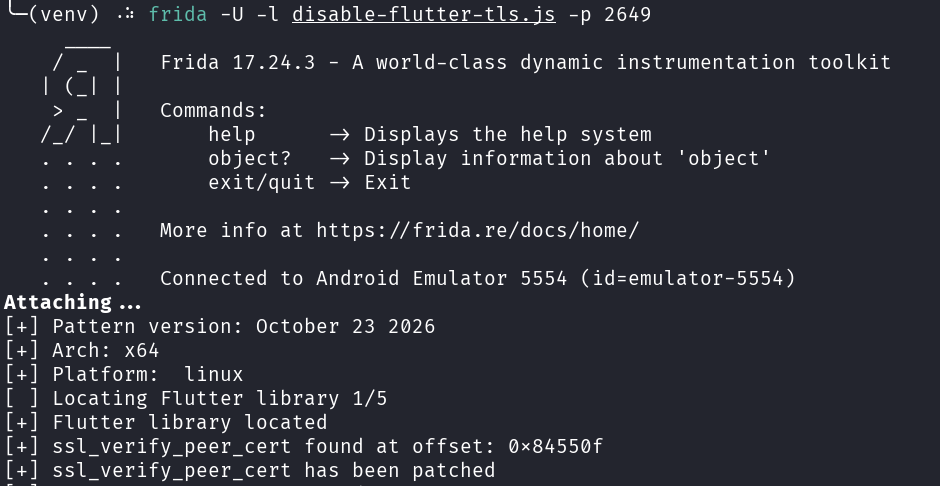
Happy hacking!
Tip: Decompile the APK and throw LLMs against the code. Use Frida to hook methods.
iOS Apps
Before using Frida, one has to establish a working iOS mobile penetration lab setup:
- Use a physical iDevice (iPhone or iPad) and jailbreak it. Make sure that you run an iOS version that is supported by the target mobile application you want to assess. Install additional tools to your liking like Filza, OpenSSH, SSLKillSwitch3, TrollVNC etc.
- There are various Jailbreaks available. I won't go into detail on how to jailbreak your iDevice. Though, research about Dopamine, Palera1n and Trollstore. May read this.
- Ensure the Burp Suite CA is installed as profile onto the iDevice. Just download the cacert.der onto the iDevice and install it. No jailbreak or root required. Works natively.
- May read this for detailed instructions.
- Connect your iDevice to the OpenVPN network using the OpenVPN Connect iOS app from the Apple AppStore. Make sure that the client config contains the necessary dhcp proxy definitions, which define your Kali instance's VPN IP and Burp Suite's HTTP port as target. Make sure Burp Suite listens on the correct VPN interface.
- As soon as the iDevice is in the same OpenVPN network as your Kali machine, you can natively reach it. May confirm using nmap and scanning TCP/22, which is typically available after a Jailbreak.
- Install frida on the iDevice using Sileo
- Open Sileo, add the repository source
https://build.frida.reand install frida. May require a Respring.
- Open Sileo, add the repository source
- Run frida-server on the iDevice
- Just connect to the iDevice using SSH. Should work over VPN from your Kali Linux instance. Then spawn frida with the command
frida-server -l <YOUR-VPN-IDEVICE-IP>. You basically tell the iDevice to run frida and listen on the iDevice's VPN IP address for frida instructions from your Kali.
- Just connect to the iDevice using SSH. Should work over VPN from your Kali Linux instance. Then spawn frida with the command
Once these prerequisites are fulfilled, we can switch to our Kali instance and start bypassing Flutter's SSL verification by using Frida:
# make sure to connect your kali to the OpenVPN and configure Burp Suite's proxy to listen on all interfaces or the OpenVPN interface specifically.

# configure a python virtual environment
virtualenv -v venv
source venv/bin/activate

# install frida and objection
pip install frida-tools
pip install objection

# use frida to list apps
frida -H <IDEVICE-VPN-IP> -a

# use frida to bypass flutter
# instead of com.myproject.app, please define your target app
# instead of <IDEVICE-VPN-IP>, please define your iDevice's VPN IP
frida -H <IDEVICE-VPN-IP> --codeshare l4rm4nd/disable-flutter-tls-v2 -f com.myproject.app
Tada 🚀 Your mobile app will be spawned by Frida and our bypass script from Frida Codeshare will find the memory offsets of ssl_verify_peer_cert via pattern matching and patch the SSL verification function dead.
Any API call will now go over the configured HTTP/HTTPS proxy, which typically is your Burp Suite instance. However, this only works if Flutter adheres to our proxy definitions via findProxy... sadly and unlikely.
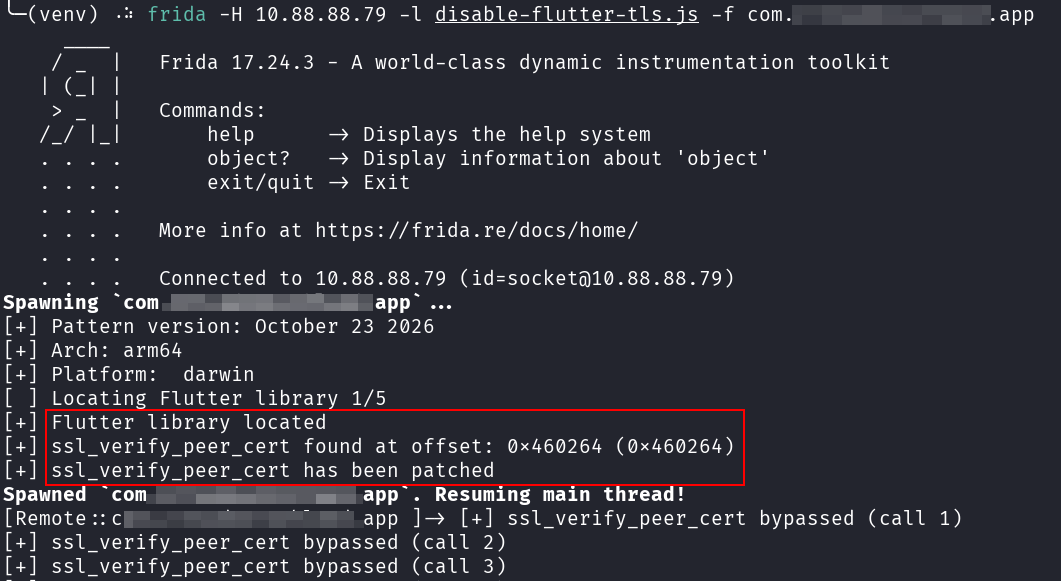
If this does not work yet, you have two alternatives: configure transparent traffic redirection with iptables on your OpenVPN server and run Burp Suite in invisible proxy mode (see NVISO's guide), or inject an additional Frida script to force HTTPS connections through your proxy.
The iptables approach is generally more robust because it operates at the network layer, independently of the application's proxy implementation. However, I often try the Frida-based approach first because it requires less infrastructure setup.
You can try my force-ios-flutter-proxy.js script. It intercepts IPv4 TCP connections to port 443, redirects them to your Burp proxy, and establishes HTTP CONNECT tunnels. It also tracks DNS resolutions to preserve the original hostnames in CONNECT requests whenever possible.
Simply download the script, configure your Burp proxy's VPN IP address and port, and run it as follows:
frida -H --codeshare l4rm4nd/disable-flutter-tls-v2 -l force-ios-flutter-proxy.js -f com.myproject.appUsing Frida to bypass Flutter on iOS and force an HTTP/HTTPS proxy
It may look like this then:
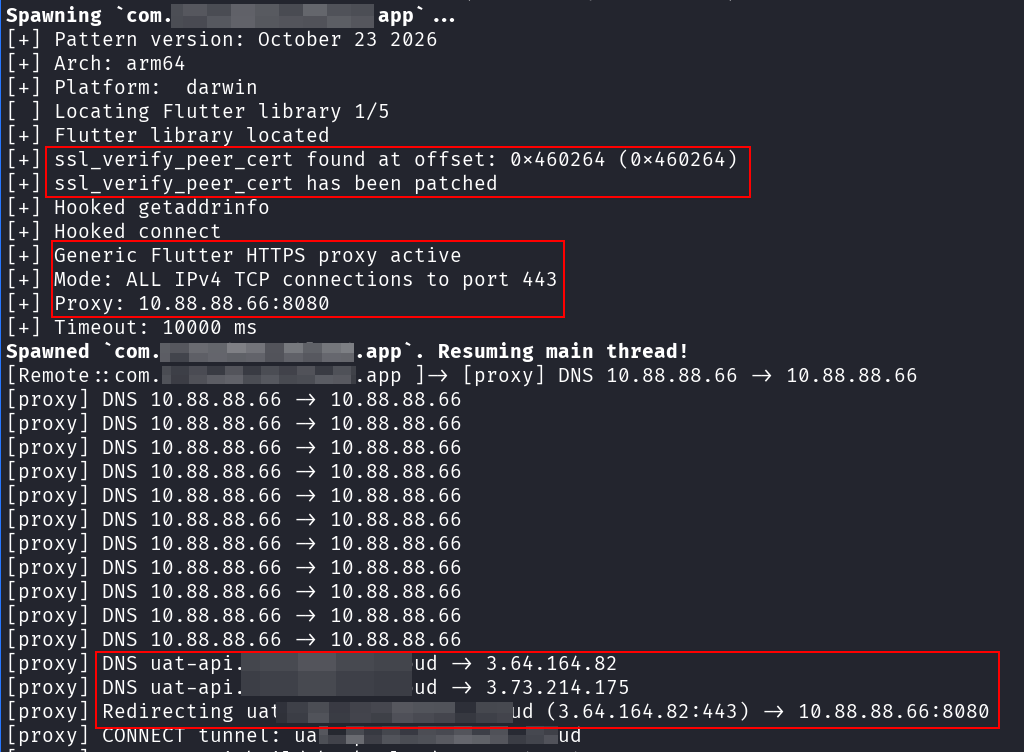
Happy hacking!
Tip: Classdump the unencrypted IPA and throw LLMs against the code. Use Frida to hook methods.
Conclusion
Flutter's cross-platform architecture introduces some additional considerations when conducting mobile application penetration tests. In particular, its networking implementation can behave differently from traditional native Android and iOS applications regarding proxy configuration and TLS certificate verification.
However, with the right approach, these obstacles can be overcome. By forcing traffic through an interception proxy and using Frida to bypass Flutter's TLS verification, security researchers can inspect the underlying API communication and continue with their usual mobile application testing methodology.


 LRVT
LRVT
You want to assess your mobile application's security? Let's get a pentest quote from professionals like me and secure your application and API backends timely:




Discussion